SimpleSYN Version 7 released
SimpleSYN Version 7 includes functional enhancements and improvements that make your Outlook synchronization even more efficient, stable, and user-friendly.
The new major version has been optimized for the classic Outlook 2024 version and already supports all future classic Outlook releases.
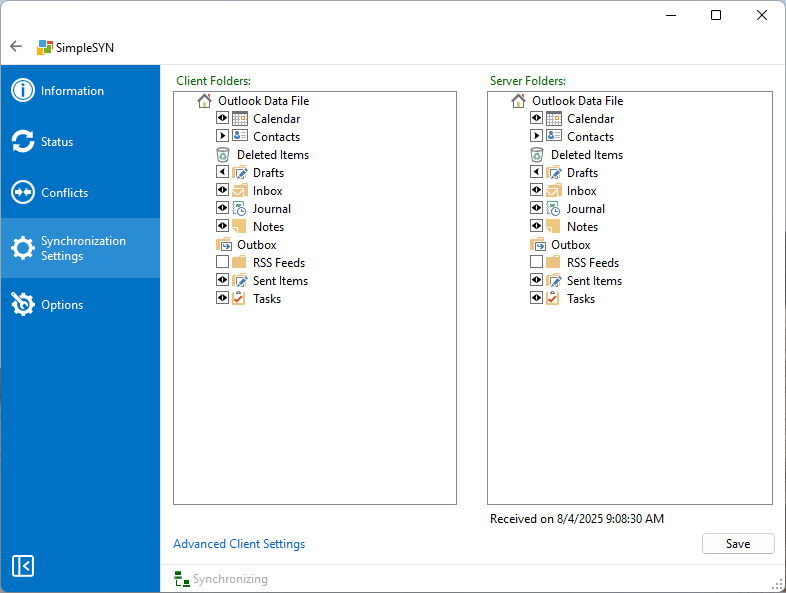
The synchronization status is now permanently displayed in the main window, allowing you to monitor the current data transfer status at any time. For a more compact layout, the navigation bar can be collapsed if needed. Update notifications have also been improved: information about new versions now appears additionally in the Information section instead of being shown exclusively as a pop-up message.
Synchronization error handling has been enhanced. Issues accessing data files—such as locked files—are now communicated more clearly, preventing empty folder lists when synchronization errors occur. The password entry process has also been revised, and you can now optionally show the entered password to reduce typing errors.
Behind the scenes, the SimpleSYN service has been further optimized for stability and performance. The display of data files has also been improved: they are now shown in sorted order for better clarity. In addition, a new configuration export/import function allows easy backup and restoration of individual settings.
In addition, the handling of open Outlook items during synchronization has been significantly improved. Changes made by SimpleSYN during an active synchronization are now immediately reflected in open emails, contacts, or calendar entries.
Version 7 also includes several additional minor adjustments and optimizations that further enhance the reliability and usability of the application.
Download
SimpleSYN Business v7
SimpleSYN Standard v7
Changelog | License agreement (EULA) | Documentation | Privacy | System requirements
Installation Notes:
An existing SimpleSYN installation of the previous version will be replaced during the installation.
Upgrade Notes:
- From Version 6 to Version 7:
All data and configurations will be transferred automatically. - From Version 5 to Version 7:
Data transfer and synchronization status update will occur automatically during setup. Please do not cancel this process, otherwise all data will be resynchronized!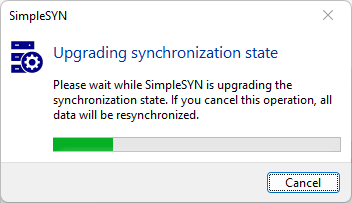
- When upgrading from older versions, SimpleSYN must be set up again. The initial synchronization will run once again.
The following improvements / changes are included in version 7:
- Optimization for classic Outlook 2024: Now supports all future classic Outlook versions.
- Permanent status display: The current synchronization status is now permanently shown in a dedicated bar in the main window.
- Revised user interface: The navigation bar can be collapsed to provide a more compact layout.
- Improved update notifications: Information about new versions now also appears in the “Information” section, not just as a pop‑up.
- Enhanced error handling: Issues accessing data files are now clearly reported, preventing empty folder lists in case of synchronization errors.
- Password visibility option: Passwords can now be displayed during entry to help avoid typing mistakes.
- Address book maintenance: Deleted contact folders are now reliably removed from the Outlook address book.
- Improved Status Database dialog: Properties of the status database can now be edited more clearly and intuitively.
- Optimizations in the SimpleSYN service: Stability and performance of the SimpleSYN service have been further improved.
- Bug fix: Resolved an issue that occurred when deleting backup items via the add-in.
- Hiding non-synchronizable folders: The server-side “Deleted Items” folder is no longer shown, as it cannot be synchronized.
- Sorted display: Data files are now displayed in a clear and sorted order.
- Configuration export/import: Settings can now be easily backed up and restored.
- Improved updating of open items: Updates are now applied more reliably to items currently open in Outlook.
- Resynchronization for incomplete data files:: If a data file is restored from a backup or, for any other reason, does not contain all data from a previous synchronization, a full resynchronization is triggered automatically. In versions prior to 7, missing data in such cases was still interpreted as a deletion.
- Various minor improvements: Additional internal optimizations enhance overall stability and usability.